

Volume Knob / Native macOS app
Your Mac’s audio.
Within easy reach.
Switch from headphones to speakers, dial in the right volume, and control Spotify from one compact window. Keep your hands on the keyboard and your attention on what you’re doing.
For macOS 13 or later. Mac App Store release in preparation.
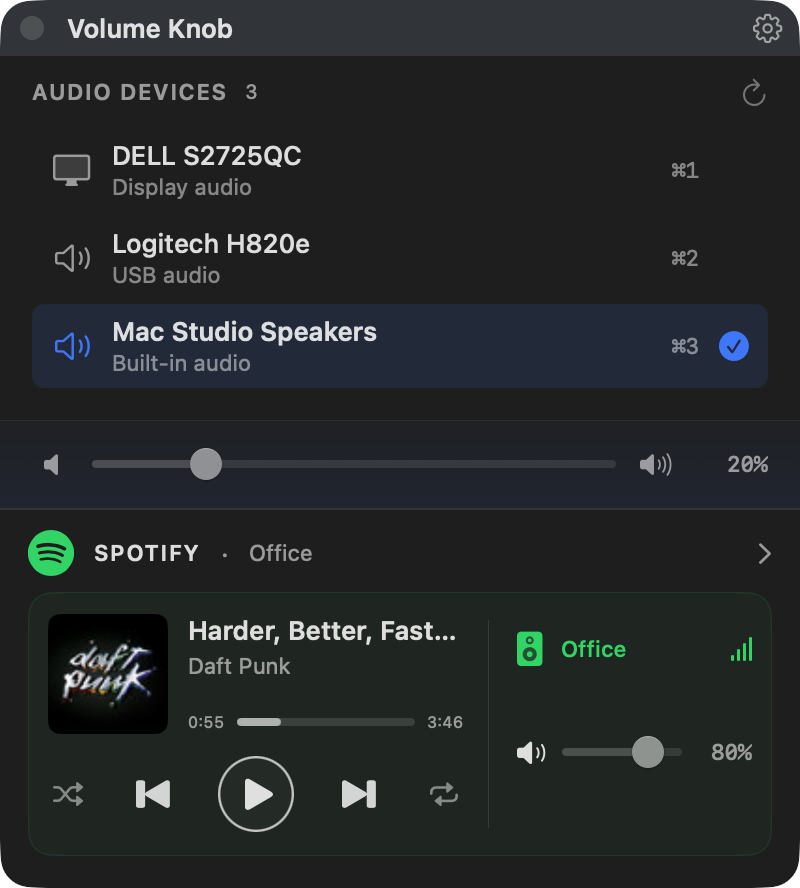
Optional Spotify controls shown enabled.
Everyday audio, fewer detours
The right output. The right level.
Switch outputs in a click
Move between your Mac’s speakers, headset, and other connected outputs. See what’s selected at a glance. The list stays in sync as devices connect or disconnect.
Find the volume between too quiet and too loud
Choose 1%, 2%, 5%, or 10% steps for each device. Volume Knob remembers your choice across reconnects. Hold Shift while adjusting for a temporary 1% step.
Mute, then pick up where you left off
Click the selected output’s icon to mute. Click again to restore its previous level, or use the slider to unmute at a new volume.
Keep only the devices you use
Hide unused outputs from the picker and bring them back from the Hidden Devices menu. Your choices survive relaunches and reconnects.
Built for your keyboard
A shortcut away, from any app.
Press ⌃⌘V to bring Volume Knob forward. Pick an output, adjust the level, and press Esc to get back to work. Prefer different keys? Remap the controls in Settings.
- ⌘1–⌘9
- Jump straight to an output
- ↑ / ↓
- Move between outputs
- ← / → or j / k
- Adjust volume by the device’s saved step
- m
- Mute or restore volume
Default bindings shown. Audio shortcuts work while the picker is focused; the bring-to-front shortcut works across apps without Accessibility permission.
For the speakers in your display
Less reaching for monitor buttons.
Volume Knob can adjust the hardware speaker volume on compatible HDMI and DisplayPort monitors—even when macOS doesn’t offer a volume slider for them. It uses DDC/CI, the control interface built into supported displays.
Enable DDC/CI in your monitor’s menu. Support depends on the display and cable or dock connection. Volume Knob enables controls only after it can uniquely identify the display and read its speaker volume; monitors with duplicate names aren’t supported.
Optional Spotify integration
Your music, beside your audio controls.
See what’s playing, pause or skip a track, scrub to a favorite part, and toggle shuffle or repeat. Switch Spotify Connect devices and adjust their volume without changing your Mac’s system volume.
Spotify is off by default. Enable it in Settings and connect your account in your browser. Playback controls also have their own customizable keyboard shortcuts when the picker is focused.
Requires Spotify sign-in and API access; Spotify volume control requires Premium. Development-mode access may require an allowlisted account or a personal Spotify Client ID. Available controls depend on the playback device and Spotify’s restrictions.
At home in your menu bar.
Switch outputs, mute, or choose a volume preset from the menu-bar icon while the picker is hidden. Hide the Dock icon too, if you prefer. The global shortcut still brings the window back whenever you need it.
Built with SwiftUI and AppKit, Volume Knob follows your Mac’s light or dark appearance.
A few things worth knowing
Does it control volume separately for every Mac app?
No. Volume Knob controls the selected system audio output. It doesn’t change your microphone, the separate sound-effects output, or apps that have chosen their own output. The optional Spotify controls manage Spotify playback and device volume separately.
Do I need an account or internet connection?
Not for your Mac’s audio controls. Output switching and local volume controls work without an account or internet connection. Spotify is optional and requires internet access and a Spotify sign-in.
What information does Pixelcop collect?
Volume Knob sends no analytics, telemetry, or crash reports to Pixelcop. Your preferences stay on your Mac. If you connect Spotify, the app communicates directly with Spotify, saves tokens in macOS Keychain, and caches device information locally. Read the privacy policy.
Need a hand with your setup?
Tell us what you’re connecting, your macOS and app versions, and what’s happening. Volume Knob is developed by Pixelcop Research, Inc.